
Tesla Model Y: Replacing Wiper Blades
For optimum performance, replace the wiper blades at least once a year. Replacement blades must meet the following criteria:
- The blade on the driver's side must be 26 inches (650 mm) long and 21 inches (530 mm) long for the blade on the passenger's side.
- Ensure the connector on the replacement blade is the same as the original blade. Different connectors may prevent the replacement blade from connecting to the wiper arm on the vehicle.
You can purchase replacement wiper blades on http://www.tesla.com.
NOTE: Only install replacement blades that are identical to the original blades. Using inappropriate blades can damage the wiper system and windshield.
To replace the wiper blades:
1. Shift into Park and turn off the wipers.
2. Touch Controls > Service > Wiper Service Mode > ON to move the wipers to the service position.
3. Lift the wiper arm a short distance away from the windshield, just far enough to access the wiper blade.
CAUTION: Wiper blades do not lock into a lifted position. Do not lift a wiper arm beyond its intended position.
4. Place a towel between the wiper arm and windshield to avoid scratching or cracking the windshield.
5. Hold the wiper arm and press the locking tab while sliding the blade down the arm.
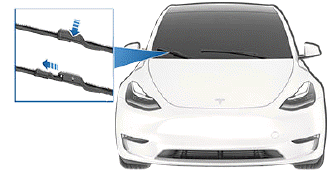
6. Align the new wiper blade on the wiper arm and slide it toward the end of the wiper arm until it locks into place.
7. Turn Wiper Service Mode off to return the wipers to their normal position.
Cleaning Washer Jets
If a windshield washer becomes blocked, use a thin strand of wire to clear any blockages from the nozzles.
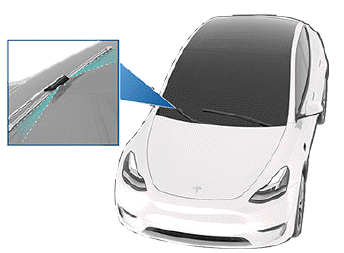
WARNING: Do not operate the washers while cleaning Model Y. Windshield washer fluid can irritate eyes and skin. Read and observe the washer fluid manufacturer's instructions.
READ NEXT:
 Removing the Maintenance Panel
To check fluid levels, remove the maintenance panel:
1. Open the hood.
2. Pull the maintenance panel upward to release the
clips that hold it in place.
3. If checking the Battery coolant, remove
Checking Brake Fluid
WARNING: Contact Tesla immediately if you notice
increased movement of the brake pedal or a
significant loss of brake fluid. Driving under these
conditions can result in extended stopping
distance
SEE MORE:
Manually Releasing Charge Cable
If the usual methods for releasing a charge cable from
the charge port (using the charge handle release button,
touchscreen, or mobile app) do not work, carefully
follow these steps:
1. Ensure that Model Y is not actively charging by
displaying the charging screen on the touchscreen. If
necessa
Boombox
NOTE: Boombox is available only on vehicles equipped with the Pedestrian
Warning System (PWS).
Boombox, an app in Toybox, uses the Pedestrian Warning System (PWS) speaker
to play media externally when Model Y is parked. You can customize sounds by plugging in a specifically-formatted
USB drive, a
