
Tesla Model Y: Correct Driving Position
The seat, head support, seat belt and airbags work together to maximize your safety. Using these correctly ensures greater protection.
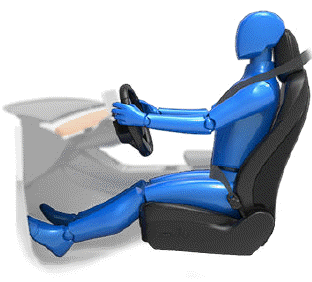
Position the seat so you can wear the seat belt correctly, while being as far away from the front airbag as possible:
1. Sit upright with both feet on the floor and the seat back reclined no more than 30 degrees.
2. Make sure you can easily reach the pedals and that your arms are slightly bent when holding the steering wheel. Your chest should be at least 10 inches (25 cm) from the center of the airbag cover.
3. Place the shoulder section of the seat belt mid-way between your neck and your shoulder. Fit the lap section of the belt tightly across your hips, not across your stomach.
Model Y seats include integrated head supports that cannot be adjusted or removed.
READ NEXT:
 Adjusting Front Seats
Move seat forward/backward and adjust the seat's
height and tilt angle up/down.
Adjust backrest.
Adjust lumbar support.
WARNING: Before adjusting a front seat, check
that the area around the
Adjusting Second Row Seat Backs
Model Y provides seating for up to three
passengers in the second row. The seat back is split 60/40 so adjusting the left
seat back moves the seat backs for both the left and center seating position
Moving Second Row Seats (7-seater only)
Lift the bar located beneath each outboard
seating position to unlock and move the second row seats forward or rearward.
The bench seats have a 60/40 split. Therefore, the bar on the left side moves
SEE MORE:
Operating Navigate on Autopilot
Once enabled, the Navigate on Autopilot button appears
on the map's turn-by-turn direction list whenever a
navigation route is active and the route includes at least
one controlled-access highway. When enabled, the
Navigate on Autopilot button is blue and the turn-by-
turn direction displays the
About HomeLink
f your vehicle is equipped with
the
HomeLink Universal Transceiver, you can
operate up to three Radio Frequency (RF)
devices, including garage doors, gates,
lights, and security systems.
NOTE: Depending on date of manufacture, market
region, and options selected at time of purchase, some
veh
