
Tesla Model Y: Do Not Transport with Wheels on the Ground
The front and rear motors in Model Y generate power when the wheels spin. Always transport Model Y with all four tires off the ground. Ensure that the tires are unable to spin at any time during transport.
WARNING: NEVER TRANSPORT YOUR VEHICLE WITH THE TIRES IN A POSITION WHERE THEY CAN SPIN. DOING SO CAN LEAD TO SIGNIFICANT DAMAGE AND OVERHEATING. IN RARE CASES EXTREME OVERHEATING MAY CAUSE THE SURROUNDING COMPONENTS TO IGNITE.
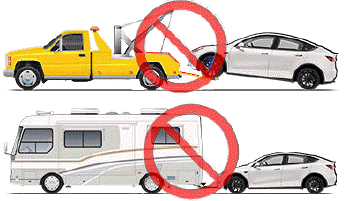
Do not transport Model Y using any method that is not specified by Tesla. Adhere to the instructions provided in the following sections and observe all warnings and cautions provided. Damage caused by improper transporting of your vehicle is not covered by the warranty.
NOTE: Tesla is not liable or responsible for reimbursing services not dispatched through Tesla Roadside Assistance.
READ NEXT:
 Approved Methods for Transporting
A flatbed truck or comparable transport vehicle is the
recommended method of transporting Model Y. The
vehicle can face either direction when using a flatbed.
If Model Y must be transported withou
Activate Transport Mode
Transport Mode keeps the parking brake disengaged
while winching Model Y onto a flatbed truck. When
active, Transport Mode displays a message indicating
that the vehicle will remain free-rolling. T
Pull Onto Flatbed Truck From Front
NOTE: If Model Y has no low voltage power, you need an
external low voltage power supply to open the hood or use the touchscreen.
CAUTION: To avoid damage, only pull the vehicle
onto a flatbed truck
SEE MORE:
Trailer Towing
The maximum trailer weight (including all
cargo and additional equipment), and the trailer tongue weight depend on the
number of occupants in your vehicle and the tires being used. The maximum towing
capacity and trailer tongue weight must never exceed the following:
*Applicable only to vehicle
Enabling and Customizing Navigate
on Autopilot
To enable Navigate on Autopilot, touch Controls >
Autopilot > Navigate on Autopilot (Beta). Then, to
customize how you want Navigate on Autopilot to
operate, touch Customize Navigate on Autopilot:
Enable At Start Of Every Trip: Choose whether or not
you want to automatically enable Navi
