
Tesla Model Y: Accessing the Cargo Area
To access the cargo area inside the rear trunk, pull up the strap at the rear of the cargo cover. You can then fold the cargo cover forward or remove it from Model Y.
Secure all cargo before moving Model Y, and place heavy cargo in the lower trunk compartment.
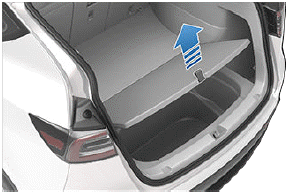
The cargo weight should be distributed as evenly as possible between the front and rear trunks.
CAUTION: Never load more than 176 lbs (80 kg) in the lower tub compartment of the rear trunk or more than 397 lbs (180 kg) on the upper floor. Doing so can cause damage.
WARNING: When loading cargo, always consider the vehicle's Gross Vehicle Weight Rating (GVWR) (see Vehicle Loading). The GVWR is the maximum allowable total mass of the vehicle including all passengers, fluids, and cargo.
READ NEXT:
 Opening
To open the front trunk, ensure Model Y is in Park, and
then do one of the following before pulling the hood
open:
Touch the associated Open icon on the touchscreen.
Double-click the front trunk
Closing
The Model Y hood is not heavy enough to latch under its
own weight and applying pressure on the front edge or
center of the hood can cause damage.
To properly close the hood:
1. Lower the hood unti
SEE MORE:
Charging Equipment
Charging equipment designed specifically to charge
your Model Y is available from Tesla. A Tesla Wall
Connector, which installs in your parking space, is the
fastest way to charge Model Y for daily use.
Model Y can also be charged using a Mobile Connector
and the appropriate adapter(s) that all
Checking and Cleaning Wiper
Blades
Periodically clean the edge of the wiper blades and
check the rubber for cracks, splits, and roughness. If
damaged, replace the blade immediately to prevent
damage to the glass and improve visibility.
Contaminants on the windshield, or on the wiper blades,
can reduce the effectiveness of the wi
