
Tesla Model Y: Identification Labels
Tesla Model Y (2020-2026) Owner's Manual / Specifications / Identification Labels
Vehicle Identification Number
You can find the VIN at the following locations:
- Touch Controls > Software.
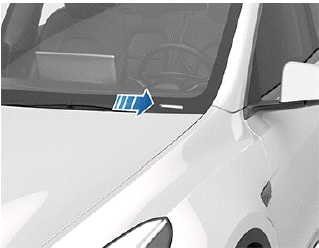
- Stamped on a plate located at the top of the dashboard. Can be seen by looking through the windshield on the driver's side of the vehicle.
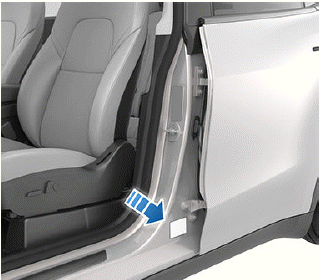
- Printed on the Vehicle Certification label, located on the door pillar. This can be seen when the driver's door is open.
Emission Control Label
The emission control label is located on the opening face of the liftgate.
NOTE: For vehicles with a model year of 2022 or newer, the emission control label is now located on the inside of the front hood and may not match the label shown.

READ NEXT:
 Vehicle Labeling
It is important to understand your vehicle's original tire
sizes and pressures, and the GVWR (Gross Vehicle
Weight Rating) and GAWR (Gross Axle Weight Rating).
This information can be found on two
Vehicle Certification Label
The Vehicle Certification label provides:
GVWR - Gross Vehicle Weight Rating. The maximum allowable total mass of
Model Y. This is calculated as the weight of Model Y equipped with the
heaviest
SEE MORE:
Three Types of Keys
Model Y supports three types of keys:
Phone key - You can set up your personal phone as a "phone key" that
communicates with Model Y using Bluetooth. A phone key supports automatic
locking and unlocking.
Key card - Tesla provides a key card that communicates with Model Y
using short range r
Adding Stops to a Route
After you have entered a destination, you can edit your
route by adding, deleting or reordering stops. Touch the
three dots at the bottom of the turn-by-turn direction
list to view options to edit your route.
Add Stop allows you to add a stop
by
searching for a location or adding a Home,
Rece
© 2019-2026 Copyright www.temoy.org
