
Tesla Model Y: Vehicle Labeling
It is important to understand your vehicle's original tire sizes and pressures, and the GVWR (Gross Vehicle Weight Rating) and GAWR (Gross Axle Weight Rating). This information can be found on two labels attached to Model Y.
Both labels are visible on the door pillar when the front door is open.
NOTE: If your Model Y is fitted with Tesla accessory wheels or tires, your Model Y may include an additional label indicating that values may differ from what is stated on the label.
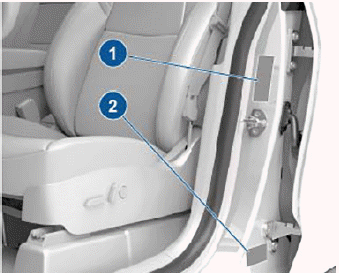
- Tire and Loading Information Label
- Vehicle Certification label
WARNING: Overloading Model Y has an adverse effect on braking and handling, which can compromise your safety or cause damage.
CAUTION: Never store large amounts of liquid in Model Y. A significant spill can cause electrical components to malfunction.
Tire and Loading Information Label
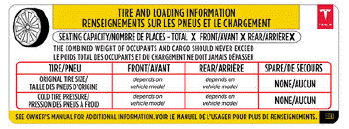
The Tire and Loading Information label provides:
- The maximum number of occupant seating positions.
- The maximum vehicle capacity weight.
- The size of the original tires.
- The cold inflation pressures for the original front and rear tires. These pressures are recommended to optimize ride and handling characteristics.
United States/Canada:
Mexico:
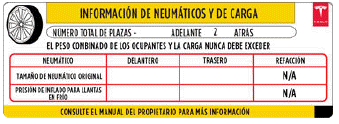
Never change this label, even if you use different tires in the future.
NOTE: If Model Y is loaded to its full capacity, double check all tires to ensure they are inflated to their recommended pressure levels.
WARNING: Tire pressures printed on the Tire and Loading Information label DO NOT APPLY to towing. When towing, tire pressures must be increased. For information about the tire pressures required when towing, see Towing and Accessories.
READ NEXT:
 Vehicle Certification Label
The Vehicle Certification label provides:
GVWR - Gross Vehicle Weight Rating. The maximum allowable total mass of
Model Y. This is calculated as the weight of Model Y equipped with the
heaviest
Calculating Load Limits
1. Locate the statement "The combined weight of
occupants and cargo should never exceed XXX lbs or
XXX kg" on the "Tire and Loading Information" label.
2. Determine the combined weight of all occup
Dimensions
Exterior Dimensions
*Values are approximate. Dimensions can vary depending on a vehicle's options
and various other factors.
CAUTION: Depending on configuration (such as wheel selection), your
v
SEE MORE:
Exterior/Interior Overview
Exterior Overview
Exterior lights
Autopilot camera
Front door handle
Key card sensor, Autopilot camera
Rear door handle
Charge port
Autopilot cameras
Exterior mirrors
Radar sensor, if equipped (hidden from view)
Hood/front trunk
Front tow eye cover
Wheels and tires
Rear trunk
Rear vi
Trailer Mode
Trailer Mode must always be active when towing a trailer. When you connect a
trailer's electrical connection while the vehicle is in Park, Model Y
automatically engages Trailer Mode. When you disconnect the trailer's electrical
connection, Trailer Mode does not automatically disengage. To manuall
